HomeWAV
- 3.6
- Rating
- 1.00M
- Installs
- Free
- Price

 Analysis by App-foxy
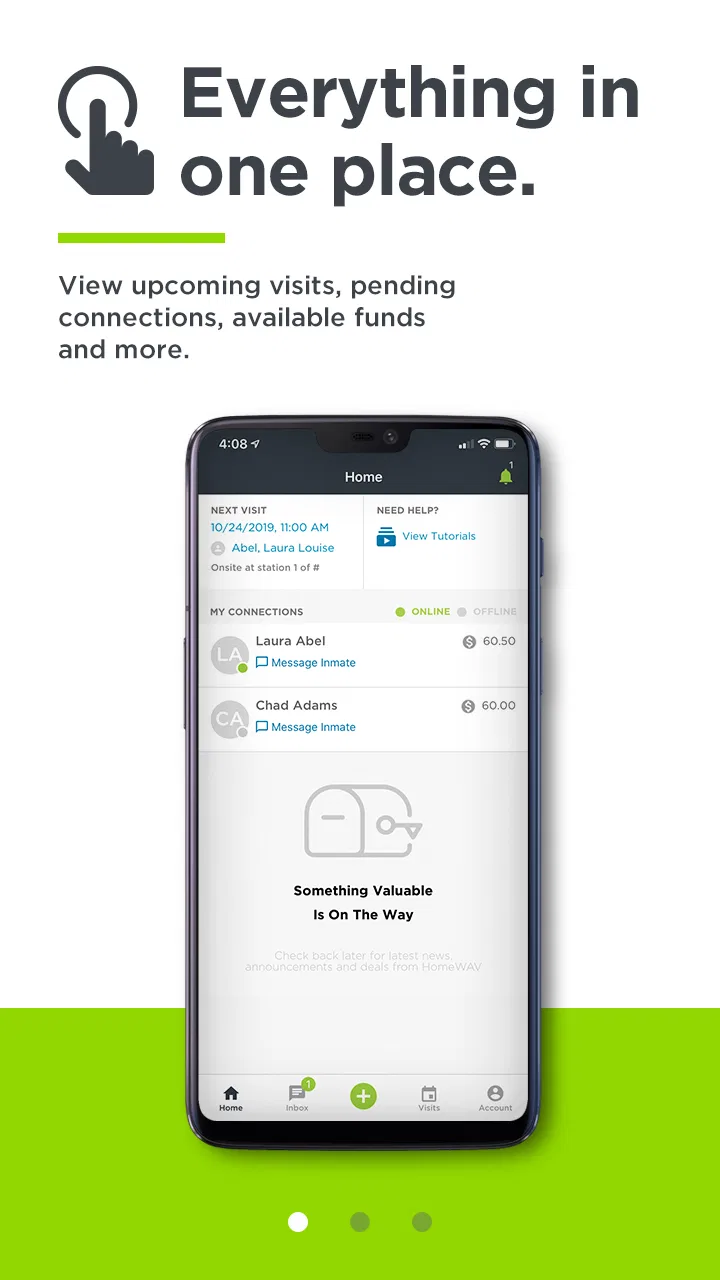
Staying connected with someone in custody is rarely as simple as sending a message or starting a video call. The person inside may have limited access to communication services, while family and friends outside need a practical way to arrange contact from an ordinary phone. That is the problem HomeWAV is built around. I see it as a focused communication app for families and friends who need to visit with incarcerated people, rather than as a general-purpose chat service.
My first impression is that its value depends less on entertainment or social features and more on whether it fits the communication process you already need to follow. HomeWAV is free to download, developed by HomeWAV LLC, and listed for Everyone. It has been available since October 24, 2012, which gives it a long presence in a category where reliability and familiarity matter. At the same time, a long-running app is not automatically a frictionless one, so I would approach it as a purpose-built tool and judge it by how clearly it handles a sensitive conversation.
What HomeWAV is really for
HomeWAV is not the app I would choose for keeping up with friends through casual texts, group chats, or social posts. Its purpose is much narrower: helping people outside a correctional facility arrange communication with someone who is incarcerated. That narrow focus is important because it changes what “good” looks like. A clean contact list and fun stickers are irrelevant here; clear account steps, dependable access, and understandable choices matter much more.
You May Also Like

 Blood Strike: 2.5 Anniversary
Blood Strike’s Loadouts Turn Every Drop Into a Tactical Gamble
A close look at Blood Strike’s custom loadouts: how fast access to signature weapons reshapes its battle royale rhythm, rewards preparation, and narrows the gap between fights.

 Pandora - Music & Podcasts
Pandora’s Music Is Easy to Start, but Harder to Recover
Pandora’s strength is its low-effort path from a seed to a station. Its weak spot is how much confidence it asks you to place in connection, setup, and quiet recovery.

 8 Ball Pool
 Is Built on Rivalries, Rematches, and Routine
A close look at the rivalries, rematches, shared routines, and unanswered safety questions that turn a quick pool match into a persistent mobile community.

 Samsung Music
’s Quiet Strength Is Playing What You Already Own
Its reach comes less from spectacle than from dependable access to a personal library. That simplicity is both the app’s strongest retention engine and its ceiling.

 AccuWeather: Weather Radar
AccuWeather Review: A Quick, Clear Forecast for Everyday Decisions
For everyday plans, the best forecast is the one you can understand quickly. AccuWeather makes rain timing, radar, and local conditions easy to act on, with a few trade-offs.

 Hill Climb Racing
Why Hill Climb Racing Still Turns Crashes Into One More Run
A tiny car, a bumpy hill and one more upgrade: Hill Climb Racing keeps resurfacing because its simple chaos makes every near-miss feel personal.
More From Our News Desk



In practical terms, the app is aimed at relatives, partners, friends, and other approved contacts who want a digital route to a visit. The person deciding whether to use it is usually not browsing for alternatives in the usual app-store sense. They may be trying to respond to a specific facility’s communication process, support someone during a difficult period, or maintain a relationship when in-person visits are hard to organize.
That context also explains why I would not compare it directly with WhatsApp, FaceTime, or ordinary SMS as though they were interchangeable. Those services are generally designed for people who can freely choose one another and communicate through an open internet connection. HomeWAV belongs to a more controlled setting. If the facility or the intended contact does not use the service, installing it alone will not solve the problem. The app makes the most sense when it is part of the communication route available to the person inside.
The public store figures show a 3.6 average from around 11 thousand ratings, with roughly 4.5 thousand written reviews and more than 1 million installs. I read that combination as a reason to be realistic rather than dismissive. There is clearly a substantial user base, but the rating also suggests that experiences are mixed. In a sensitive communication situation, even small points of confusion can feel much bigger than they would in a casual app.
Trust begins with the situation, not the icon
When an app is involved in contact with someone in custody, trust has several layers. I would want to know whether I am using the right service, whether my account is under my control, what choices appear before I begin a visit, and what information I am being asked to provide. I would also pay attention to the difference between what the app visibly lets me choose and what I might simply assume it does behind the scenes.
That distinction is especially important with HomeWAV. I would not treat its narrow purpose as proof that every part of the experience is automatically private or effortless. Instead, I would review each screen carefully, use only the information needed for the intended communication, and avoid making assumptions about data handling that are not clearly shown in the app or its published privacy materials.
My practical advice is to install it before the moment you urgently need a visit. Take time to look through the sign-in and account screens, understand how the intended contact is selected, and notice whether the app presents any confirmation before a communication begins. A few minutes of preparation can prevent the stressful experience of trying to create an account while another person is waiting for a scheduled conversation.
Account control matters more than extra features
For this kind of service, I care more about basic control than feature count. Can I recognize which account I am using? Can I review the contact or visit I am about to start? Can I tell whether I am signed in correctly? These are simple questions, but they become important when a phone is shared with other household members or when several people may need access to communication with the same incarcerated person.
I would keep the account details organized and avoid casually handing a signed-in phone to someone else. If another family member needs to participate, it is better to understand the app’s own account process than to pass around personal credentials. This is a small but meaningful trust practice: the person using the app should know whose account is active and which contact the session concerns.
I would also check the operating-system requirement before planning around it. HomeWAV supports Android 7.0 and later, so an older device may be a problem even if it still runs other communication apps. That is worth checking early, particularly for relatives who rely on an older phone. If the device cannot meet the requirement, the best alternative may be a newer household device rather than switching to a completely different messaging app that the facility does not support.
The current version is 2.26.5. I would keep the app updated through the normal store process, especially before an important visit. Updates can affect sign-in behavior, compatibility, and the way screens are presented. I would not wait until the day of a planned conversation to discover that the app needs maintenance or that an older installation behaves differently from the current release.
Data-sensitive moments deserve a slower approach
The most sensitive part of using HomeWAV is not necessarily tapping the visit button. It is the information surrounding the account and the person you are trying to reach. I would read every request for personal details instead of filling forms automatically. If a field is unclear, I would pause and look for an explanation in the app or the service’s official help and privacy information.
I would also avoid using public Wi-Fi for a private conversation whenever possible. A trusted home connection or a secure mobile connection is a better everyday choice, not because I can promise a particular technical result, but because it reduces the number of unknowns around the network. I would keep the phone’s operating system protected with its normal lock screen and would not record or share a conversation unless everyone involved understands what is happening and the applicable rules allow it.
Notifications deserve attention too. A message preview on a locked screen can reveal more than intended, especially if the phone is used by several people or left where others can see it. I would review notification settings at the device level and decide whether previews are appropriate. This is a useful example of user control that sits outside the main app: even when an app gives you a communication channel, the phone can still expose details through alerts.
Another sensitive moment comes when a family member asks someone else to manage the account. That arrangement can be convenient, but it can also blur responsibility. Before doing it, I would agree on who handles sign-in, who receives notices, and who is allowed to start or manage a visit. A clear household routine is safer than several people guessing which account is active.
How I would use it in an ordinary family situation
Imagine a relative has been told that HomeWAV is the route for communicating with a person in custody. I would begin by confirming that the intended facility and contact are actually associated with the service, then install the app on the device that will be used most reliably. I would create or access the account calmly, review the visible choices, and make sure the phone has enough battery and a stable connection before the planned conversation.
Before starting, I would move to a quiet room and use headphones if they make the conversation easier to hear. I would keep the phone stationary rather than walking around with it, because a stable setup makes a video visit less distracting. I would also tell other people in the household when the device is needed, so an incoming call or accidental use does not interrupt the session.
If the visit does not begin as expected, I would avoid repeatedly tapping every option. First, I would check the account state, the selected contact, the connection, and any on-screen instruction. Then I would close and reopen the app only if appropriate, while keeping track of what I have already tried. In a high-stress situation, a simple written note with the account email or username, the intended contact, and the planned time can prevent confusion without exposing passwords.
Afterward, I would sign out if the device is shared and review whether any notification or account detail remains visible. That extra step may feel unnecessary on a personal phone, but it is worthwhile on a family tablet or a phone used by several relatives. The best workflow is not merely “open the app and call”; it is preparing the account, protecting the device, confirming the recipient, and leaving the device in a known state afterward.
Where it differs from normal communication apps
Compared with FaceTime or Google Meet, HomeWAV is less about inviting anyone with a link and more about fitting into a specific communication environment. That can be an advantage when the service is the recognized route for the intended facility, because a general video-calling app may not be accepted or available to the person inside. The trade-off is flexibility: you cannot assume that every friend or relative can be reached through it in the way they could through an ordinary messenger.
Compared with SMS, it is also a different kind of tool. Text messaging is quick and familiar, but it depends on the recipient having ordinary mobile access. HomeWAV addresses a situation where that assumption may not hold. I would choose SMS for day-to-day communication with people who can freely use their phones, and HomeWAV when the correctional communication process specifically points toward it.
Compared with broad social platforms, HomeWAV is more focused and less cluttered by feeds, public profiles, and unrelated content. That focus may be welcome for families who want to concentrate on a visit. However, it also means the app is not a replacement for a complete family communication system. You may still need regular phone calls, email, or another messenger for coordinating with relatives outside the facility.
The biggest trade-off is dependence on the surrounding service. A polished interface cannot overcome an unavailable contact, an unsupported facility process, an unsuitable device, or a poor connection. That is why I would not recommend installing it simply because it has a large install count. I would recommend it when it matches the communication path you actually need.
Who will benefit, and who should look elsewhere
HomeWAV is most useful for people who have a clear reason to communicate with someone incarcerated and want a dedicated app rather than trying to force a general-purpose service into that situation. It can also suit relatives who prefer keeping this communication separate from their everyday messaging apps. The Everyone rating makes it broadly accessible from an age-label perspective, although the subject matter and family circumstances may still call for adult guidance when children are involved.
I would be cautious about recommending it to someone who expects a normal social chat app. If your goal is group messaging, sharing photos with a broad circle, or calling any contact without a facility-specific process, another communication service will probably be more natural. I would also hesitate if your phone is too old for Android 7.0, if you cannot maintain a stable connection, or if you do not have enough time to understand the account and visit process.
People who are especially concerned about privacy should take an active role rather than relying on the app name alone. Review the choices presented during setup, protect the phone, control notification previews, and read the relevant privacy information. Those steps do not require technical expertise, and they help separate visible user controls from assumptions about how the service operates.
My cautious verdict after weighing the experience
I see HomeWAV as a specialized bridge, not a universal replacement for messaging. Its strongest quality is that it is built around a real communication need that ordinary chat apps may not address. The free price removes one barrier to trying it, and its long availability plus more than a million installs show that many people have turned to it for this purpose.
Still, the average rating of 3.6 tells me to set expectations carefully. I would not promise a perfectly smooth experience, and I would not treat the app as independent from the facility, the device, the account setup, or the network connection. The right question is not whether it is better than every other communication app. The right question is whether it is the appropriate channel for the person you need to reach.
My recommendation is to prepare before an important visit: confirm that the service applies to your situation, use a supported device, keep the app current, review account screens and privacy choices, and protect notifications on shared phones. Those habits make the experience more manageable and give you more control over the parts that are actually in your hands.
For families and friends who need this specific kind of contact, HomeWAV is worth considering. For everyone else, its narrow purpose may make it feel unnecessary. I would choose it when the communication context calls for it, use it deliberately, and keep my expectations grounded in what the app visibly lets me control rather than in assumptions about what any communication service guarantees.
FAQs for HomeWAV
01What is HomeWAV and how does it work?
HomeWAV is a communication platform designed to facilitate secure video visitation between incarcerated individuals and their families or friends. Users can download the app, create an account, and schedule video calls with inmates. The app ensures privacy and convenience, allowing for seamless communication without the need for physical visits.
02Is HomeWAV available for both Android and iOS devices?
Yes, HomeWAV is available on both Android and iOS platforms. Users can download the app from the Google Play Store or the Apple App Store. This cross-platform availability ensures that a wide range of users can access and benefit from the app's services, regardless of their device preference.
03What are the costs associated with using HomeWAV?
HomeWAV operates on a pay-per-minute basis, meaning users are charged based on the duration of their video calls. The rates are typically set by the correctional facility, so they may vary. Users are encouraged to check the specific rates associated with the facility they wish to connect with before initiating calls.
04Is HomeWAV secure and private?
Yes, HomeWAV is designed with security and privacy in mind. The platform employs encryption and other security measures to protect user data and ensure that communications remain confidential. This focus on security helps maintain the integrity of interactions between inmates and their loved ones.
05Can I schedule visits in advance using HomeWAV?
Absolutely. HomeWAV allows users to schedule video visits in advance, ensuring convenience and better planning for both parties. Users can log into their accounts, select the desired time slots, and set up appointments with inmates, making it easier to maintain regular communication.
Pros
- User-friendly interface for easy navigation.
- Secure video calls with end-to-end encryption.
- Affordable pricing with various payment options.
- Real-time notifications for incoming calls.
- Compatible with both Android and iOS devices.
Cons
- Occasional connectivity issues in rural areas.
- Limited support during non-business hours.
- Requires stable internet for optimal performance.
- Some features locked behind paywalls.
- Video quality varies with network strength.

HomeWAV
Gallery